


Tie Dye
4.512.60K Reviews
App Specs
- Version
- 5.4.1.2
- Updated On
- License
- Free
- Downloads
- 100,000,000+
- Developer
- CrazyLabs LTD
- Categories
- Simulation
- Platform
- Android, iOS
Screenshots
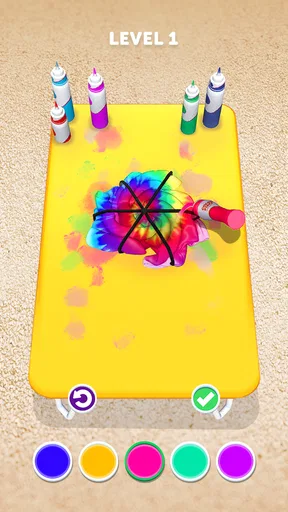
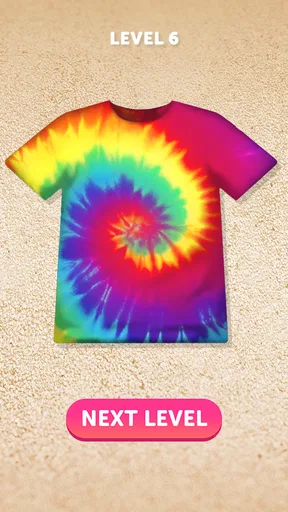
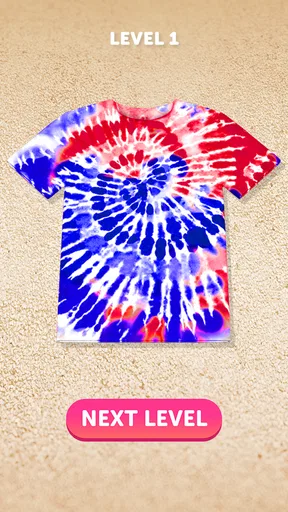
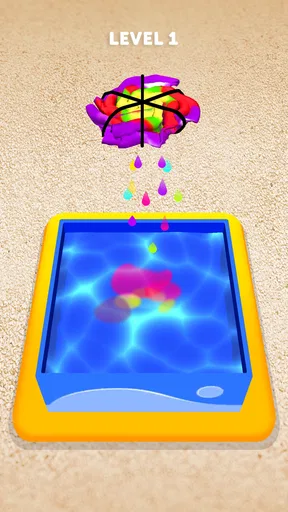
 Analysis by AppCompare
When several people share a phone or tablet, a quick creative game can turn a quiet stretch into a small group activity. I find Tie Dye works best when everyone takes a turn choosing a garment, folding it, and deciding how to color it. The appeal is immediate: there is no real dye to spill or laundry to sort afterward. It is a playful way to explore patterns together, though it is still a game rather than a substitute for making and wearing an actual tie-dyed shirt.
A low-mess activity for shared downtime
Picture a family waiting for food to arrive or a couple of friends passing time during a quiet afternoon. One person can choose the virtual fabric, another can suggest a fold, and someone else can pick the colors. That little hand-off makes the result feel collaborative without requiring a complicated plan. If you are using one device, agree on whose turn it is before starting; the enjoyment comes from making choices together, not from treating the screen as a race.
It can also suit a short solo break. I would use it when I want a colorful, low-pressure distraction, not when I need a deep creative tool or a long game with a detailed goal. The appeal is the sequence of small decisions and the reveal of the pattern. That makes it easy to stop after a design, while still giving a child or adult something concrete to talk about: which fold made the most interesting result, or which colors worked well together.
Keeping expectations and spending sensible
The game is free to download, and it is a simulation game from CrazyLabs LTD. Optional in-app purchases range from $2.99 to $49.99 per item, so I would check the purchase settings on a shared device before handing it to a child. That is a practical household boundary, not a reason to assume that anyone needs to pay to enjoy the basic idea. If you are installing it for a younger player, keeping purchases behind an adult’s approval helps avoid accidental spending.
There is also a useful boundary around what the activity can teach. It gives a child a playful introduction to choosing colors and seeing how folds affect a pattern, but the screen cannot reproduce the feel of fabric, the unpredictability of real dye, or the patience involved in a hands-on project. I would treat designs as inspiration rather than instructions. If someone wants a wearable result, a real craft session with suitable materials and adult help is the better next step.
Who will enjoy it—and who may want something else
The game is a good fit for people who enjoy visual play, simple creative choices, and a satisfying before-and-after reveal. Its Everyone content rating makes it broadly accessible, and its average rating is 4.5 from around 611,000 ratings, with about 13,000 written reviews. It has passed 100 million installs, which gives a sense of how widely it has found an audience, but those figures do not tell you whether its particular style will suit your household.
I would skip it if you are looking for a realistic textile-design app, a structured art lesson, or a game built around complex progression. Compared with drawing apps, its focus is narrower: you are shaping and coloring clothing rather than sketching anything you can imagine. Compared with real tie-dye, it is cleaner and faster, but the results remain on screen. That trade-off is exactly why it works as a casual diversion and not as a full craft replacement.
Worth Reading Before You Choose

Flipboard Shows What News Apps Must Do Beyond the Feed

Switching to Android Auto Means Rethinking Your Driving Routine

Google Calendar Makes a Crowded Week Easier to Manage

Ludo King Makes the Most of the Minutes Between Plans

Baby Panda World Brings Quick Play to Modern Phones, but Its Game Library Feels Busy

ESPN’s Live Game View Makes Following Close Games Easier
For coordination, one simple approach is to let each person make one design, then compare the results instead of trying to agree on every choice. A younger child might enjoy picking colors while an older sibling handles the folds, but that is a household arrangement rather than a special multiplayer or family feature. If the device belongs to someone else, take turns and avoid changing another person’s settings or saved work without asking.
The game was released on July 7, 2020, and its current version is 5.4.0.7. It requires Android 7.0 or later. Those details can help when checking whether an older household device is suitable; on iOS, check the relevant store page for device compatibility before installing. For a shared tablet, I would also make sure there is enough room for ordinary use and that the person who manages the device is comfortable with the installation.
There is no need to make every design a group decision. A useful rhythm is to let one player choose the garment and pattern, then invite others to suggest a color combination for the next attempt. This keeps turns moving and avoids the small disagreements that can happen when everyone wants to control the same screen. If the game is being used to occupy a child while an adult is busy, it is still worth checking in rather than assuming the app itself provides supervision or household controls.
For a real-world follow-up, save a design that the group likes and use it as a conversation starter before planning a craft project. Ask what would need to change when working with actual fabric: where to protect the work surface, what clothing is appropriate, and who will handle materials. That comparison helps keep the game’s promise in perspective while making its color experiments useful beyond the screen.
Overall, I see it as an easygoing option for short shared breaks, especially for households that want a creative activity without setting up supplies. It is less suitable for someone who expects precise design tools, a lasting digital art portfolio, or realistic craft instruction. Keeping turns clear, purchases under adult oversight, and expectations grounded makes the experience easier to enjoy. If those limits sound acceptable, it is a cheerful little way to pass time and try out color ideas.
Getting Started with Your Colorful Adventure
Diving into Tie Dye is as easy as pie. Once you have the app downloaded, you’re greeted with a splash of colors that instantly gets your creative juices flowing. The interface is pretty intuitive, so you won't find yourself fumbling around trying to figure out where things are. It’s like having your very own art studio right in your pocket. No prior artistic skills required—just your imagination and a touch of curiosity.
Exploring the Features
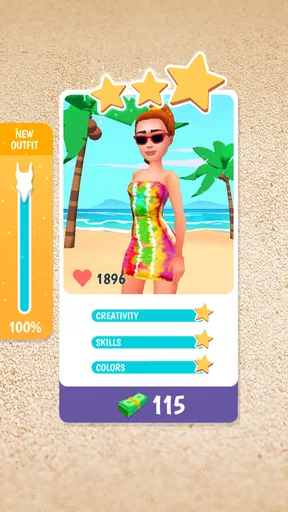
What I love about Tie Dye is its simplicity mixed with a dash of fun. You start with a plain piece of clothing, and the app guides you through the classic tie-dye process. You’ve got a variety of garments to choose from—t-shirts, hoodies, and even some quirky items like socks and bandanas. This app is like a mini fashion studio!
The app provides you with a range of colors to choose from. You can mix and match hues, creating your own signature style. The color palette is extensive, and the combinations are endless. There’s something incredibly satisfying about watching the colors swirl and blend together on screen.
Creating Your Masterpiece
Here’s where the magic happens. You get to fold, twist, and scrunch the virtual fabric just like you would in real life. The app offers several folding techniques, each producing a unique pattern once dyed. Whether you’re going for the classic spiral or something a bit more abstract, there’s a method for everyone. It’s all about experimenting and finding what works for you.
After you’ve chosen your colors and technique, it’s time to see the results. Watching the dye seep through the folds is oddly satisfying, and seeing your creation come to life is a rewarding experience. You can save your designs, share them with friends, or even use them as inspiration for real-life tie-dye projects.
Why You’ll Love It
This app is perfect for anyone looking to unwind and get a little creative. It’s great for all ages, making it a fun activity for kids and adults alike. Whether you’re a seasoned artist or someone who struggles to draw a straight line, Tie Dye offers a liberating experience that's all about having fun and expressing yourself.
Plus, with the convenience of having it on your phone, you can dive into your artistic side anytime, anywhere. Waiting for the bus? Why not whip up a new design? Stuck in a waiting room? Create a masterpiece while you wait. It’s like having an art class in your pocket!
Final Thoughts
If you’re looking for a stress-free way to tap into your creative side, Tie Dye is definitely worth checking out. It offers a delightful escape into a world of color and creativity without the hassle of setting up a real-life tie-dye workshop. So, why not give it a go and see what colorful creations you can come up with? You might just discover a new hobby or, at the very least, have a blast trying!
Pros
- Creative freedom with endless design options.
- Relaxing gameplay perfect for stress relief.
- User-friendly interface for all ages.
- Regular updates with new patterns and colors.
- Offline mode available for on-the-go fun.
Cons
- Limited to basic tie-dye patterns.
- In-app purchases can be pricey.
- Ads can interrupt gameplay frequently.
- No multiplayer or social features.
- Some design tools are hard to control.
FAQs for Tie Dye
What is the main objective of the Tie Dye app?
The Tie Dye app is designed to simulate the popular art of tie-dyeing on your device. Users can choose from various garments, patterns, and colors to create unique designs. The app provides a relaxing and creative outlet, allowing users to experiment with different techniques without the mess of traditional dyeing.
Is the Tie Dye app suitable for all ages?
Yes, the Tie Dye app is suitable for all ages. Its intuitive interface is designed to be user-friendly, making it accessible for both children and adults. The app’s content is family-friendly, with no explicit material, ensuring that everyone in the family can enjoy the creative process.
Does the Tie Dye app require an internet connection?
The Tie Dye app can be used without an internet connection for creating and saving designs. However, certain features like accessing new patterns or sharing your creations on social media may require an internet connection. It’s best to have occasional connectivity to enjoy all features fully.
Are there in-app purchases or ads in the Tie Dye app?
The Tie Dye app includes in-app purchases and advertisements. Users can choose to purchase additional patterns, colors, or remove ads for a more seamless experience. While ads may interrupt gameplay occasionally, they also enable free access to the app for all users.
How does the app handle user data and privacy?
The Tie Dye app prioritizes user privacy by collecting minimal personal data. Any data collected is used to enhance user experience and is not shared with third parties without consent. Users can review detailed privacy policies within the app to understand data handling practices.


